CAD ERP integration: No more typing in bills of materials
Jan 29, 2026
|
Reading time 8 minutes
Monday morning, eight o'clock. The designer has finished the assembly. 47 items, neatly numbered. Now the parts list needs to go into the ERP – and that means: export to Excel, format it, enter it manually. Or engage the working student with it. For position 23, he makes a typo. Procurement orders the wrong material. Four weeks later, production is halted.
This scenario repeats itself daily in German mechanical engineering companies. Not because the employees are doing a bad job, but because the systems do not communicate with each other.
Why Excel lists are not an ERP strategy
In many SMEs with 10 to 30 employees, there is no ERP in the true sense. There is Excel. Orders in one spreadsheet. Inventory in another. Parts lists exported as PDFs from CAD. This works – up to a certain point.
The point is reached when:
More than two people need to access the same data simultaneously
The search for a specific order takes longer than processing it
Errors due to manual transfer regularly cost money
An employee is on vacation and no one understands his spreadsheets
A real ERP system solves these problems through a central database. But for many mid-sized companies, the alternative seemed to be only SAP – with six-figure implementation costs and years-long projects.
ERPNext: 80% of functionality at a fraction of the cost
ERPNext is an open-source ERP system with over 25,000 installations worldwide. The crucial difference to SAP or Microsoft Dynamics: no user license fees. You pay for hosting and customization, not for the right to use the software.
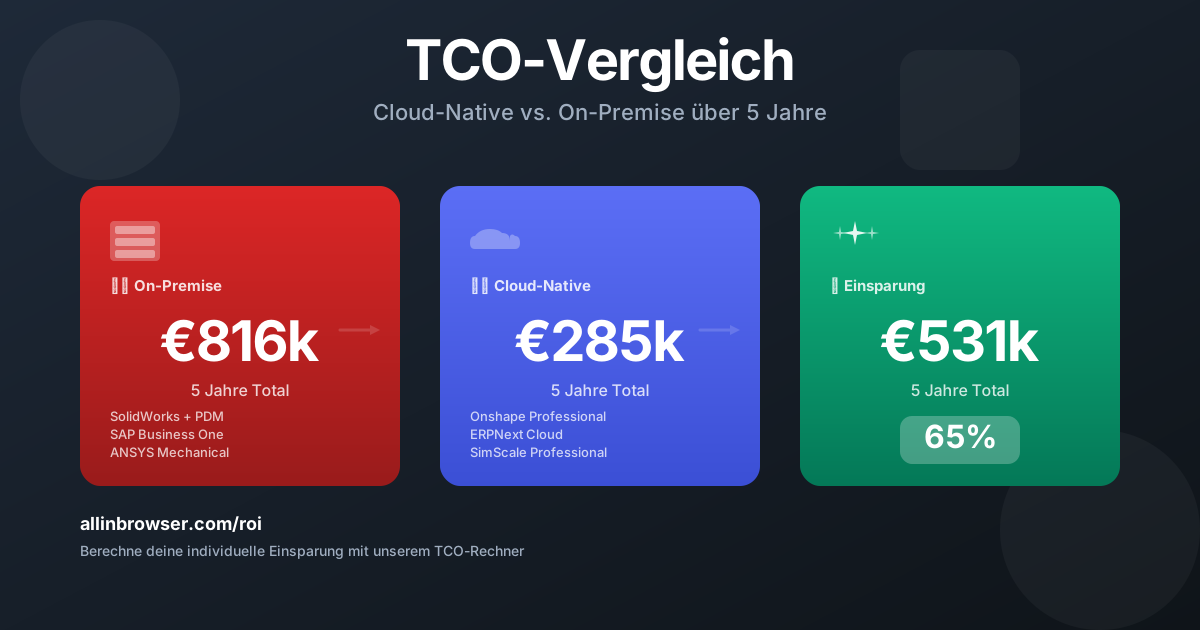
For a company with 20 employees, this means specifically: Instead of 50,000 euros in annual license costs, only hosting fees apply – typically 200 to 500 euros monthly, depending on server performance and support level.
What ERPNext covers:
Order processing and CRM
Purchasing and inventory management
Bill of materials management and manufacturing
Accounting (according to German chart of accounts)
Project management
What ERPNext is not: A complete SAP alternative for corporations. Companies with 500 employees, international locations, and complex corporate structures need different solutions. For companies with fewer than 50 employees, SAP is often overdimensioned – ERPNext scales with.
The bridge between design and production
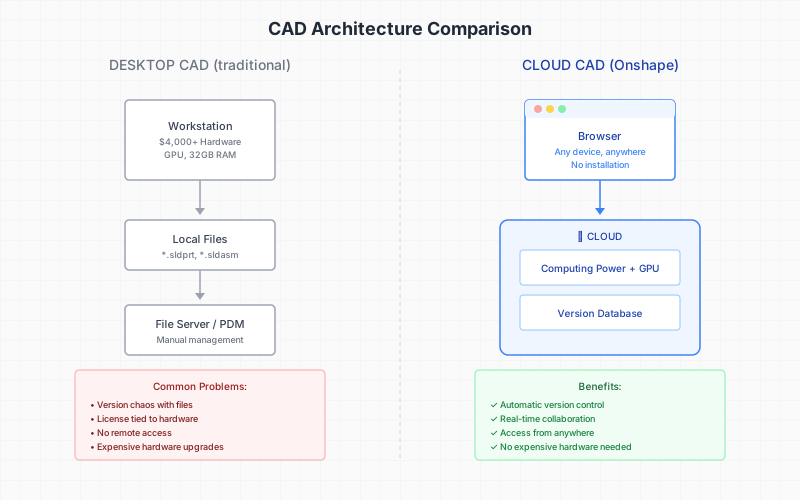
The actual problem in many mechanical engineering firms is not the missing ERP system but the gap between design and the rest of the company. The designer works in his CAD world, procurement in his ERP world, and in between lies a stack of printed parts lists.
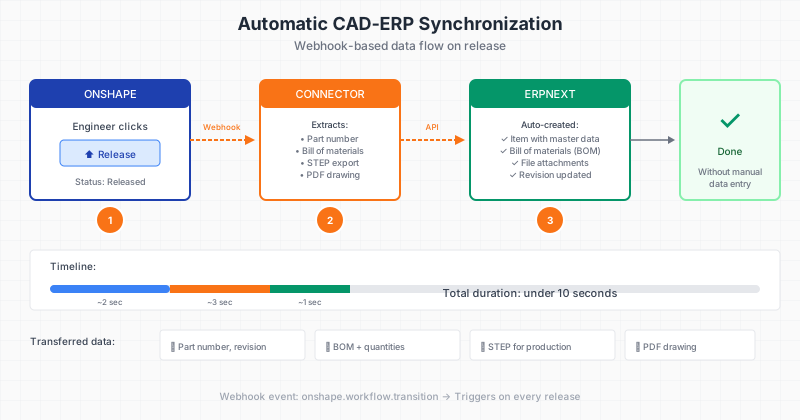
Real CAD-ERP integration closes this gap. When you release a component in Onshape, a webhook automatically transfers all relevant data to ERPNext:
Part number and revision
Complete bill of materials with quantities and material assignments
STEP files for manufacturing
PDF of the technical drawing
No manual data entry. No transfer errors. No waiting time between design release and procurement start.
How the integration works technically
The connection between Onshape and ERPNext is based on webhooks – automatic notifications triggered by certain events. When a designer clicks "Release" in Onshape, the following happens:
Onshape sends a message to a middleware server
The server extracts the bill of materials data from the model
The data is formatted in the ERPNext format
ERPNext automatically creates or updates items
STEP and PDF files are exported to document management
The entire process takes seconds. The designer doesn’t notice it – except that he no longer has to retype parts lists.
The "growing parts list" in custom machine engineering
In custom machine engineering, there is a specific problem: The bill of materials is not fixed at the beginning. It grows during design. Parts are added, changed, and removed again. The classic sequence "Design → Release → Procurement" does not work here.
ERPNext supports growing bills of materials. You can release parts as soon as they are designed – even if the overall assembly is not yet finished. Procurement runs parallel to design. If something changes, the system automatically updates requirements and orders.
This significantly shortens project durations. Instead of first designing and then procuring, both processes run in tandem.
SAP, Dynamics, or ERPNext: The honest categorization
SAP Business One is SAP's product for medium-sized businesses. It usually costs 3,000 to 5,000 euros per user per year, plus implementation. For this, you get a mature system with excellent support and a broad partner network. If your business grows to 100+ employees or you have corporations as customers demanding SAP integration, it is a solid choice.
Microsoft Dynamics 365 is similarly priced and integrates seamlessly into the Microsoft world. If your company relies heavily on Microsoft 365 and needs deep integration with Outlook, Teams, and SharePoint, Dynamics has advantages.
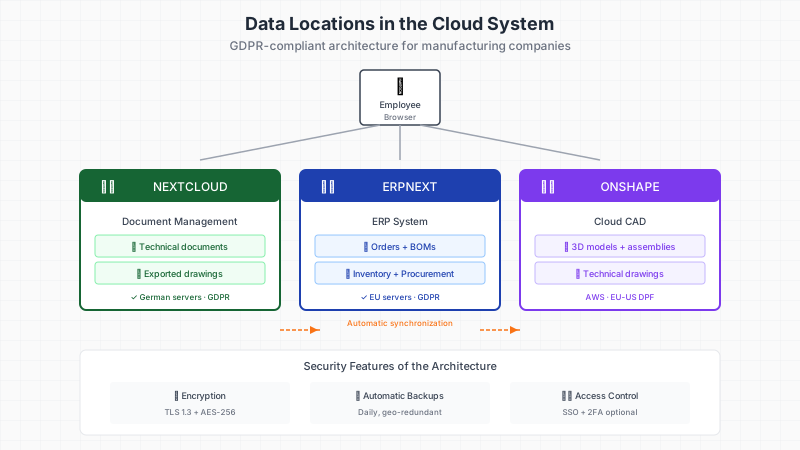
ERPNext doesn't incur licensing fees as an open-source system. You are not dependent on price increases and retain full control over your data. The implementation is typically faster and cheaper than with the big vendors. The trade-off: The partner network in Germany is smaller, and some specialized features may be missing.
For companies with fewer than 50 employees that do not have to meet corporate compliance requirements, ERPNext is the more economically sensible choice in most cases.
What a complete implementation costs
Transparency about costs: A complete implementation project with Onshape, ERPNext, and Nextcloud typically lies between 15,000 and 50,000 euros – depending on the scope of customizations and data migration.
In addition, ongoing costs arise:
Onshape Professional: from 2,100 euros per year and user
ERPNext hosting: 200-500 euros monthly
Nextcloud hosting: 50-150 euros monthly
The amortization results from several factors: The time saved through automatic CAD-ERP synchronization typically averages two to five hours per week and designer. This is alongside reduced IT costs (no server maintenance), fewer errors due to manual data entry, and faster response times through location-independent access.
With a typical hourly rate of 80 euros and three designers, each saving three hours per week, that amounts to 37,000 euros per year – the investment pays off within one to two years.
The next step: A 90min. cloud readiness check analyzes your current processes and shows specifically where automation has the greatest leverage.