GDPR-compliant in the cloud: Where is my data?
Jan 29, 2026
|
Reading time 6 minutes
"Our data remains on our server." I often hear this sentence in conversations with executives. The statement behind it: The cloud is insecure, the own server is secure. This image is understandable – but it is no longer true.
The own server in the basement is not automatically more secure than a professional cloud solution. Often, the opposite is the case. But the concerns are real, and they deserve an honest answer.
The biggest security risk is not the cloud
The most common IT security incidents in medium-sized companies have a common cause: outdated software without security updates. The Windows Server 2012 in the basement, which is "still running". The firewall whose firmware has not been updated for three years. The backup that no one tests.
Professional cloud providers invest more in security than most medium-sized companies could: redundant data centers, automatic backups, encryption at rest and during transmission, 24/7 monitoring, dedicated security teams.
This does not mean that the cloud is automatically secure. It means that the question "Cloud or local?" is the wrong question. The right question is: "Who operates my IT infrastructure more professionally – I myself or a specialized provider?"
Where your data actually resides
When it comes to cloud storage, the server location is crucial – for legal and practical reasons.
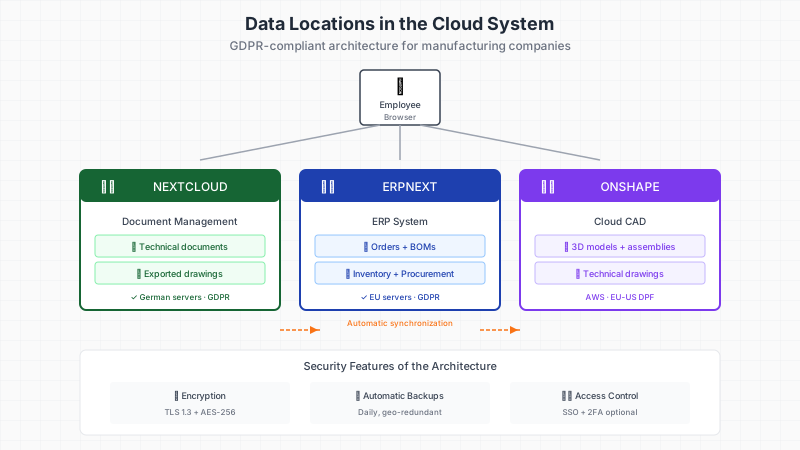
Nextcloud as a document management system can be operated with German hosts that have their servers in German data centers. This means that only German data protection laws apply. A data processing agreement (DPA) regulates how the hoster handles your data. You retain full control.
ERPNext can optionally be operated with a European cloud provider or on your own server. The decision depends on how much IT expertise is available internally and how critical the data is.
Onshape stores data in AWS data centers. For pure CAD models, this is usually unproblematic. For particularly sensitive documentation – such as customer contracts or production documents containing personal data – I recommend storing the exported files in Nextcloud instead of directly in Onshape.
Understanding the Shared Responsibility Model
A common misconception: "If my data is in the cloud, the cloud provider is responsible for security." This is only partially true.
Cloud security operates according to the Shared Responsibility Model:
The provider is responsible for:
Physical security of the data centers
Availability of the infrastructure
Network security
Basic encryption
You are responsible for:
Access rights and user management
Strong passwords and two-factor authentication
Which data you upload
Compliance with industry regulations
A secure cloud provider is of little help if all employees use the same password and sensitive drawings are sent via email.
GDPR and US Cloud Services: What Changes in 2025
The legal situation with US cloud providers has become complicated. The EU-US Data Privacy Framework from 2023 was supposed to create legal certainty, but political developments in the USA have led to new uncertainties in 2025. German cloud providers like Nextcloud report a tripling of inquiries since the beginning of the year.
For mechanical engineering companies, this means concretely:
Pure CAD models without personal data are less critical
Documentation with customer data, employee data, or business secrets should be placed with European providers
Data processing agreements must be kept up to date
When in doubt: choose German servers
Nextcloud as GDPR-compliant base
Nextcloud is an open-source platform for file storage and collaboration. The advantage over services like Dropbox or Google Drive: You decide where the servers are located. With a German host with ISO-27001 certification and DPA, you are on the safe side.
What Nextcloud offers:
File synchronization like Dropbox, but self-hosted
Shared folders with permission control
Full-text search in documents
Integration with office applications
Mobile apps for iOS and Android
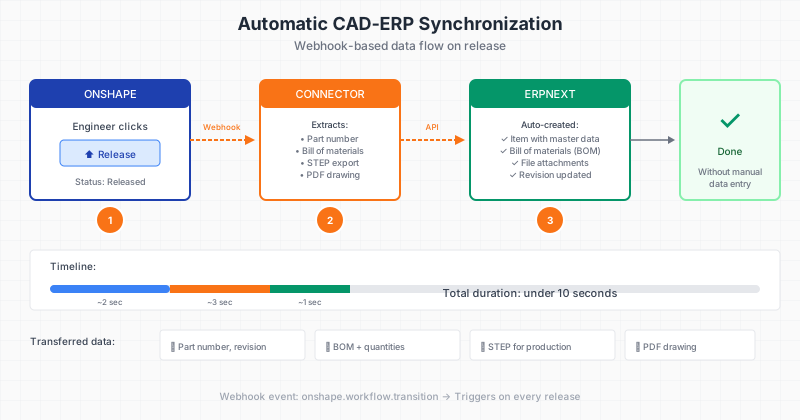
For mechanical engineering companies, Nextcloud is the sensible repository for technical documentation, customer files, and exported CAD data. The integration with Onshape and ERPNext ensures that released drawings and parts lists are automatically saved in the right folder.
The Backup Question: Cloud vs. Local
One argument for the local server is often: "I have my data under control." But control also means responsibility – for backups, for redundancy, for disaster recovery.
Questions you should answer honestly:
How often are backups performed? Daily? Weekly?
Where are backup media stored? In the same building as the server?
When was the backup last tested? Does the restoration work?
What happens in case of a break-in, fire, or water damage?
Professional cloud providers replicate data across multiple geographically separated data centers. An outage at one location has no impact on availability. Achieving the same level locally would require significant investments.
A Pragmatic Cloud Strategy for Machine Builders
The question is not "Cloud yes or no", but "Which data belongs where?" A sensible strategy for mechanical engineering SMEs:
In the cloud (with German/European provider):
Active working data and documents (Nextcloud)
ERP data for location-independent access (ERPNext)
CAD models for teamwork (Onshape)
Locally or in particularly secured cloud:
Archived old projects with high confidentiality value
Data subject to contractual confidentiality obligations
System-critical backups as an additional layer of security
The next step: A inventory of your current data management shows where risks lie and which cloud strategy fits your company.