Cloud CAD in Mechanical Engineering: Why the Browser is Sufficient
Jan 29, 2026
|
Reading time 7 minutes
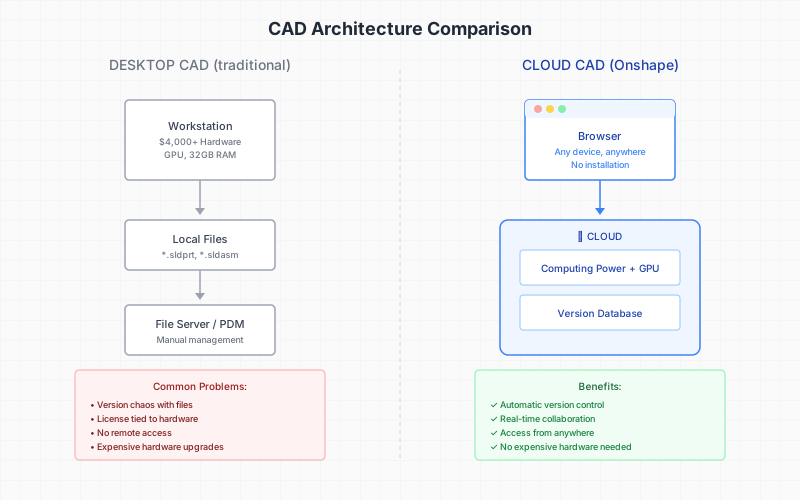
You know the situation: The designer calls because their SolidWorks won't start. The license is linked to the wrong computer. Or the laptop on the construction site is too weak for the assembly. At the same time, the project manager asks which version of the drawing is the current one – the one on the server, the one in the email attachment, or the one on the USB stick from the last customer visit.
These problems do not exist because CAD work is complicated. They exist because desktop CAD comes from a time when "collaboration" meant swapping files on floppy disks.
What differentiates Cloud CAD from Desktop CAD
The term "Cloud CAD" is often misunderstood. Many providers bundle their desktop software into a virtual machine and call it a "cloud solution." You then get Citrix or a remote desktop – with all the latency, connection drops, and the same file issues as before.
Real Cloud CAD works differently. The entire application runs in the browser. Your laptop only renders the interface while the calculations take place on servers. This has three concrete impacts:
First, you no longer need expensive hardware. A current laptop with 8 GB RAM suffices for complex assemblies – the computing power comes from the cloud. Second, there are no installations, updates, or license dongles. You open the browser, log in, and work. Third, there is no "file" in the traditional sense anymore. Your model lives in a database with a complete version history.
Onshape vs. SolidWorks: The honest comparison
Onshape is currently the only professional parametric CAD system that runs entirely browser-native. The question that mechanical engineers ask: Can this compete with SolidWorks or Inventor?
The short answer: For 80% of the design tasks in special machine construction – yes. For highly specialized applications like complex freeform surfaces or certain simulations – not quite yet.
The strengths of Onshape lie in teamwork: Multiple designers can work on the same assembly simultaneously without checking out files or creating conflicts. Version control works like Git for code – every change is traceable, and every state can be restored. And you can send a link to a supplier who can view a model in the browser without owning CAD software themselves.
The limitations concern special functions: Sheet metal processing is less mature than in SolidWorks. Certain types of simulations require external tools such as SimScale. And the ecosystem of plugins is smaller – although the native API compensates for much of this.
The learning curve for SolidWorks switchers typically takes two to four weeks. The parametric logic is similar, but the operation differs in details. Most designers report that they are productive after the first real project.
The hardware question: What you really need
A CAD workstation with a professional graphics card costs 3,000 to 6,000 Euros. With Cloud CAD, instead, you need:
A current laptop or PC with at least 8 GB RAM
A monitor with at least 24 inches diagonal
A 3-button mouse (the middle button for orbit is important)
A stable internet connection (25 Mbit/s is sufficient, 50 Mbit/s is comfortable)
That's it. No expensive graphics card, no server maintenance, no VPN configuration. An employee working from home operates with the same setup as one in the office.
Real version control instead of file chaos
The biggest problem with desktop CAD is not the software itself – it’s the file management around it. "CASE_final_v3_correction_FINAL.sldprt" is not an exaggeration but everyday life in many design offices.
Onshape solves this with a concept from software development: Branching and Versioning. Every change is automatically saved. You can jump back to any previous state at any time. If you want to try a variant, you create a branch – without endangering the original. If the variant works, you merge it. If not, you delete it.
This sounds abstract, but in practice, it means: No more fear of changes. No more hours of searching for the "right" version. No more overwrite accidents.
Which companies will benefit from the switch
Cloud CAD is not right for everyone. Companies with the following characteristics benefit the most:
Distributed teams: Designers in different locations or working from home
Frequent project work with clients: Access from the construction site or the meeting room
Limited IT budget: No dedicated IT department for server maintenance and backup
High fluctuation in hardware: No binding to specific workstations
Growth plans: Scaling through additional users instead of hardware investments
Currently, Cloud CAD is less suitable for companies with very specific CAD requirements, such as in the area of complex freeform surfaces, or with clients who strictly require native SolidWorks files.
The practical entry
The recommended approach is a parallel operation: Start new projects in Onshape while existing projects continue in the old system. This way, there is no migration pressure, and the team gradually adjusts to the new way of working.
Existing SolidWorks, Inventor, and STEP files can be imported. For complex assemblies with many internal links, it is worth evaluating beforehand: What should be actively migrated, and what can be archived in a document management system?
The next step: The 90min. Cloud Readiness Check examines whether Cloud CAD is right for your company – with a specific analysis of your current processes and a realistic assessment of effort and benefit.